ai-email-intelligence
🚀 AI Email Intelligence for Zoho CRM
Analyze emails, generate replies, and create actionable tasks — instantly inside Zoho CRM.
⚡ Quick Start
1️⃣ Install Extension
- Go to Setup → Marketplace → All Extensions
- Search AI Email Intelligence for Zoho CRM
- Click Install → Install for All Users
2️⃣ Configure API Key
- Go to Setup → Marketplace → Installed Extensions
- Open AI Email Intelligence
- Click Settings
- Enter your OpenAI API Key
- Click Save
⚠️ Required to enable all AI features
🎬 Product Walkthrough
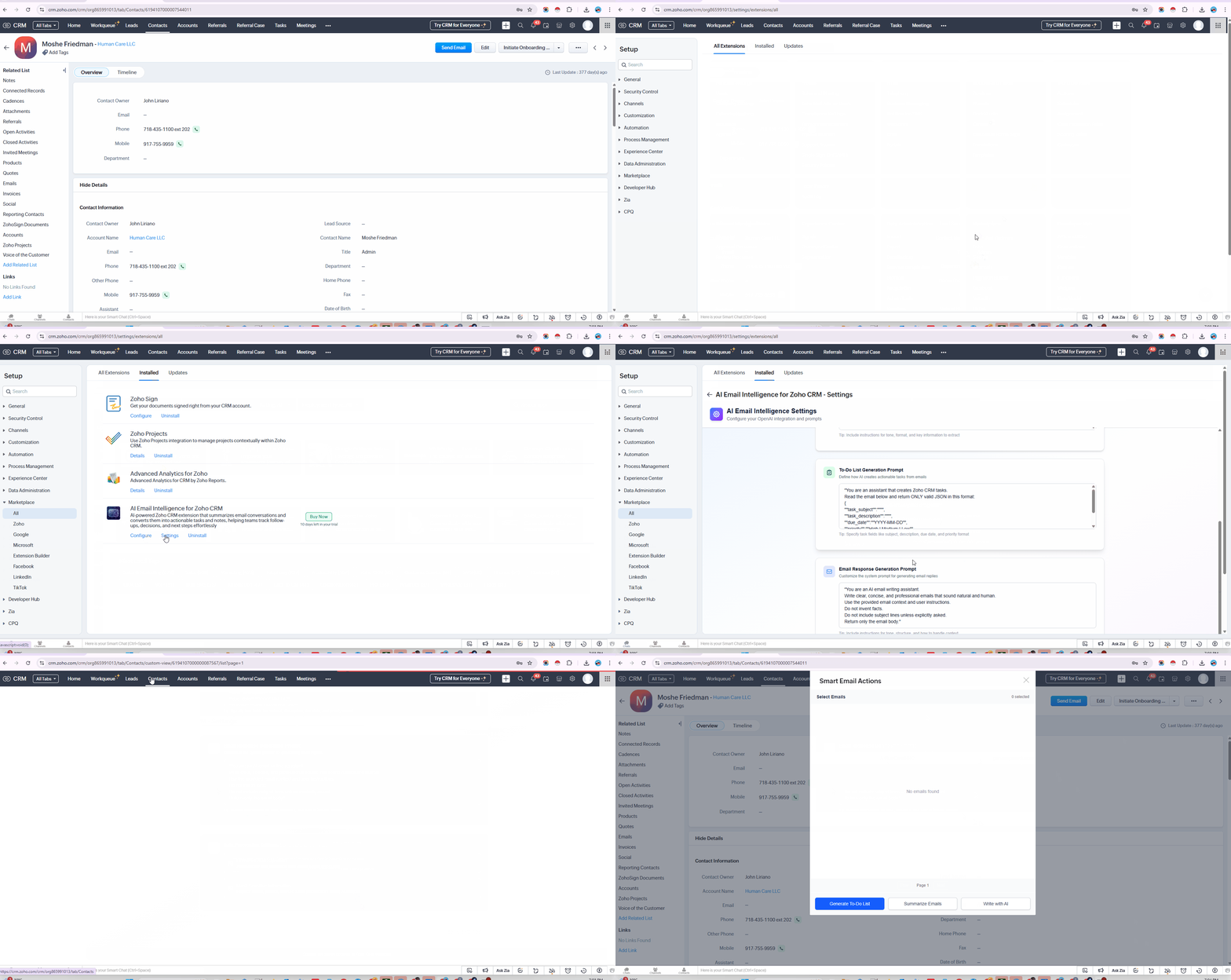
📧 How It Works
Step 1: Open a Record
- Go to Contacts / Leads / Accounts
- Open any record with email history
Step 2: Launch AI Widget
- Locate AI Email Intelligence widget
- Open Smart Email Actions
Step 3: Select Emails
- Choose one or more emails from the list
Step 4: Use AI Features
✅ Generate To-Do List
Convert emails into actionable CRM tasks
👉 Click Generate To-Do List
✅ Summarize Emails
Get quick summaries of long conversations
👉 Click Summarize Emails
✅ Write with AI
Generate professional email replies
👉 Click Write with AI
❓ FAQ
🔹 What does this extension do?
It analyzes emails and provides:
- Smart summaries
- Suggested replies
- Actionable tasks
🔹 Where can I find the widget?
Inside Contact record view
🔹 Can it send emails automatically?
❌ No
✔ Generates draft replies only
✔ Users must review before sending
⚠️ Troubleshooting
🚫 Widget not visible
- Refresh Zoho CRM
- Reopen the record
- Ensure extension is assigned to your profile
🚫 Buttons disabled
- API key not configured
- No emails in the record
🚫 No emails found
- Ensure emails exist in Emails related list
🚫 No output / response
- Email must contain content
- Check internet connection
- Try another email
🚫 Tasks not created
- Click Generate To-Do List
- Ensure task permissions are enabled
🔐 Security & Privacy
- Data is processed only when triggered
- No permanent storage of email content
- Access limited to selected CRM record
⚡ Performance
- Typical response time: 5–20 seconds
- Depends on email length and complexity
🧩 Requirements
- Zoho CRM with email integration
- Valid OpenAI API Key
- Access to:
- Contacts / Leads / Accounts
- Emails related list
📩 Support
📧 support@techiesaround.com
Please include:
- Zoho Organization ID
- Screenshot
- Issue description
💡 Pro Tip
Use Generate To-Do List to automatically convert emails into CRM tasks — saving hours of manual follow-ups.
⭐ Best Practices
- Use emails with meaningful content
- Select multiple emails for better summaries
- Always review AI-generated responses before sending
🎯 Final Note
This extension helps:
- Reduce manual work
- Improve response time
- Increase productivity